
Home>Production & Technology>Audio Cable Compatibility and Adapter Selection
Production & Technology
Audio Cable Compatibility and Adapter Selection
Modified: 3 October 2026
Table of Contents
- Getting sound from USB and HDMI audio cable adapters
- Splitting and sharing audio connections
- Connecting PC and motherboard audio
- Replacing and upgrading headphone cables
- Setting up surround sound and home theater
- Using audio interfaces and studio gear
- Understanding cable specs and safety
- Specialty gear and classroom setups
Getting sound from USB and HDMI audio cable adapters
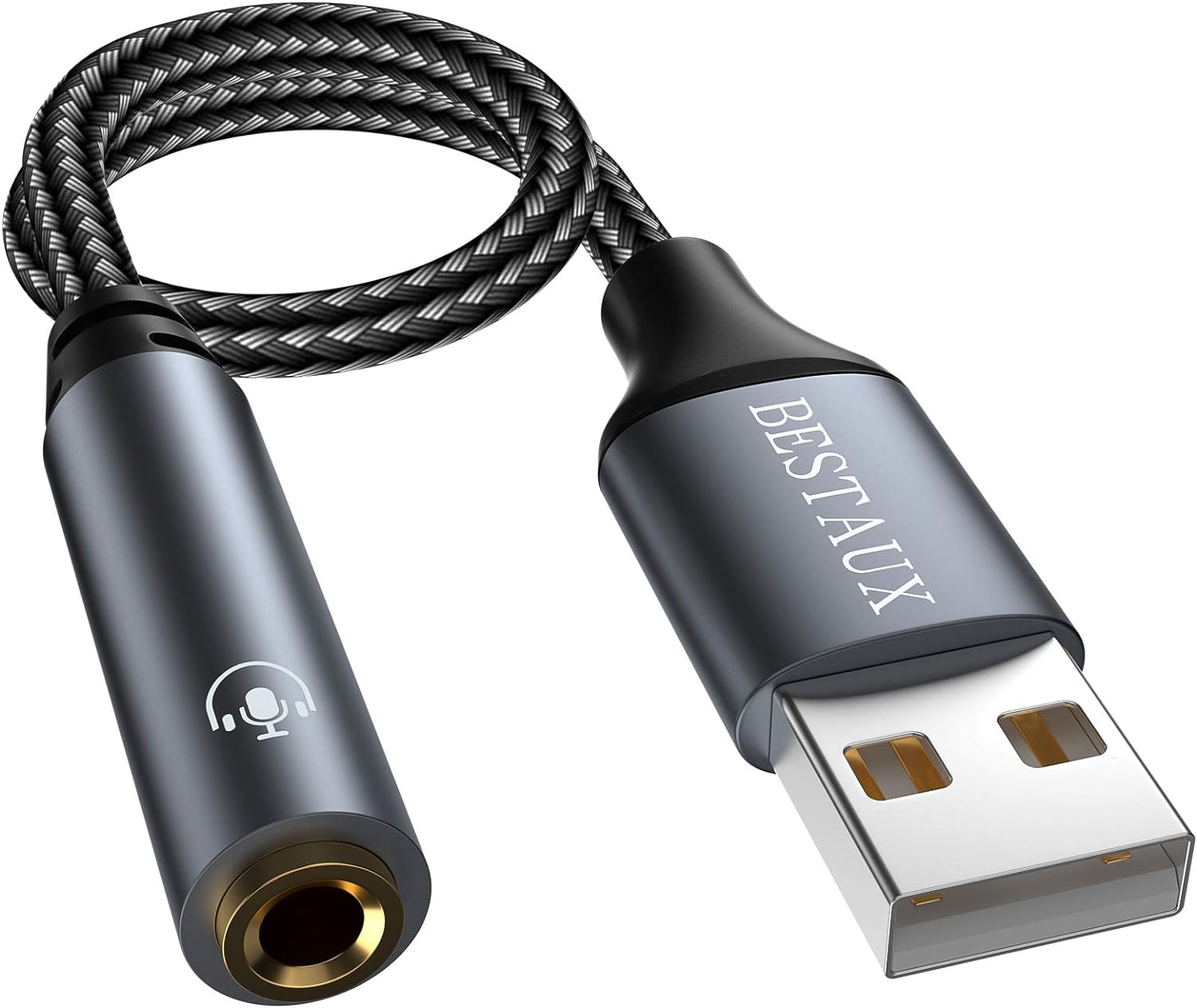
Finding the right audio cable adapters means understanding whether your signal is analog or digital before you buy. Getting analog audio from a USB or HDMI port is not just a matter of matching the shape of the connector but whether the signal is already analog or still digital. A simple passive adapter cannot turn a digital USB signal into analog audio for headphones, which is why a tiny accessory containing a DAC chip is required. If you are hunting for a compact dongle, look for models with a built-in DAC among the 11 best USB to 3.5mm jack audio adapter for 2024. A broader look at the 9 best USB audio adapter for 2024 includes units that may offer volume knobs and dedicated headphone amplification. For feeding a signal into an older stereo system or powered speakers, a standalone box is often the cleaner solution, and a roundup of the 11 best digital to analog audio converter for 2024 focuses on devices that take an optical or coaxial input and output a standard RCA line-level signal. Apple's USB-C Digital AV Multiport Adapter supports both video and audio output but delivers the signal digitally over HDMI, meaning you still need an extractor or a DAC downstream to hear it on analog cans. In a different approach to wireless streaming, a collection of the 16 best Chromecast audio for 2024 revisits Google's puck-shaped device, which featured a 3.5mm jack carrying both analog and optical digital audio output to feed a stereo directly without tying up your phone.
Splitting and sharing audio connections
Sharing a single audio stream with a friend is straightforward on recent Apple hardware. It works differently depending on whether you are going wireless or staying wired. On a compatible iPhone or iPad, iPhone 8 or later, most modern iPad Pro and iPad Air models, you can tap Share Audio in Control Center, on the Lock Screen, or directly inside the app that is playing your music or video. Then you can connect a second pair of AirPods or Beats earphones without any extra hardware. That same system also appears in the Voice Memos app. Tapping a recording, then Share and Options, lets you choose Rendered or Editable before sending the file to someone else.
Wired splitting creates a different set of problems. The signal coming out of a headphone jack is already analog, so a passive Y-cable simply duplicates it. A digital port first needs a converter. If you are trying to combine game audio and chat from a console, a guide on how to play Switch audio with audio interface can walk you through routing the console’s output into a recording or streaming setup without a noisy headphone jack loopback. In a car or an older stereo where the only input is a 3.5 mm aux port, you can use isimple calljax 3.5 audio cable to add Bluetooth to that system, turning any standard aux input into a wireless receiver. The CallJax acts as a hands-free receiver that plugs straight into the aux input. When setting up a smart speaker, the Echo Dot audio cable needs may vary by generation. Some models may include a 3.5 mm output that works with a standard aux cord. Others rely entirely on Bluetooth or an internal speaker. For more options across all these scenarios, a roundup of the 17 best audio splitter for 2024 compares passive splitters, volume-controlled distribution amps, and Bluetooth transmitters that can broadcast to multiple listeners at once.
Connecting PC and motherboard audio
Before you reach for an adapter, take a close look at the row of pins on your motherboard. The case's front-panel audio lead is keyed to fit only one way, so when you need to plug in HD audio cable, line up the blocked pin on the header with the solid plug on the connector. That header is usually labeled HD_AUDIO, AAFP, or F_AUDIO, and getting this backward is physically difficult. Forcing an AC’97 legacy plug onto that modern header will give you silence, distortion, or a dead microphone because the two pinouts are not interchangeable.
The exact label you are hunting for varies by board. If you are trying to put the HD audio cable on MSI z170a gaming pro, the board’s Realtek ALC1150 codec supports 7.1-channel audio through the rear ports, but you will need to visually check the board for the header marking. On older dedicated cards, the situation is completely different. The question of a soundblaster live where do you plug in your audio cable usually points to an internal CD_SPDIF or aux connector on the card itself, since that card predates the HD Audio standard and does not provide a direct motherboard-style hookup for your case’s front-panel jacks.
- soundblaster live where do you plug in your audio cable — Soundblaster Live Where Do You Plug In Your Audio Cable
- put the HD audio cable on MSI z170a gaming pro — Where Do I Put The Hd Audio Cable On MSI Z170A Gaming Pro
- to plug in HD audio cable — Where To Plug In HD Audio Cable
Replacing and upgrading headphone cables
When your headphones still work perfectly but the cable frays, snaps, or develops a short, finding the right replacement is often cheaper than buying a new pair, and the connector size and shape matter more than most people realize. If you need to use audio cable with bose qc35, reach for a cord with a slim 2.5 mm plug on the headphone end and a standard 3.5 mm plug on the device end; that smaller tip goes into the left earcup and shuts off Bluetooth automatically, which is exactly why you would want to read the article on how to use audio cable with bose qc35.
Owners searching for the toughest audio cable for a bose oe2 head set face a different challenge, since that model also uses a 2.5 mm-to-3.5 mm detachable cord but left the market years ago. You must verify the slim housing around the 2.5 mm plug fits the recessed port on the earcup, because a snug mechanical fit prevents crackling when the wire moves.
For gaming headsets, knowing the audio cable type for Afterglow wired headsets usually means identifying whether your particular model uses a standard 3.5 mm TRRS plug for chat and game audio or an older proprietary connector. The TRRS layout carries both the microphone signal and stereo playback on a single jack, while proprietary connectors often look like a wider multi-pin plug that locks into the headset. Check the number of black rings on the tip to confirm the wiring standard before you order a replacement cord.
Musicians and stage performers hunting for a Mee M6 Pro audio cable replacement should look for an MMCX-compatible cable, because the M6 Pro relies on that locking push-pull connector rather than a fixed wire. This design lets you swap in a fresh cord in seconds between sets and opens up a wide world of aftermarket wires with different lengths, materials, and boom microphone options, which is the very reason you would want to read the article on Mee M6 Pro audio cable replacement.
The PlayStation Gold headset mono cable issue can leave you hearing only one side of the mix when a wireless headset suddenly drops to single-channel sound. While the headset normally supports stereo and virtual surround, a TRS plug lacks the dedicated microphone contact, which can confuse the internal routing and force it into mono. Checking the cable's wiring standard may help restore the full stereo image, and that is why you would want to read the article on the PlayStation Gold headset mono cable issue.
Setting up surround sound and home theater
When connecting a Blu-ray player, game console, or AV receiver, the question of which audio cable is best for surround sound has a straightforward answer. HDMI is almost always the right choice because it carries multichannel audio in a single connection, while optical and coaxial cables can also deliver surround sound but come with more bandwidth limitations.
For the physical wiring to your passive speakers, choosing the correct speaker wire for surround sound means looking at the gauge rather than a single size. Sony specifies that 12- to 16-gauge wire is typical, with 16-gauge working well for short runs, but longer distances demand a thicker, lower-gauge cable to prevent signal loss.
When connecting audio cables to a Blu-ray player, plug an HDMI cable from the player into any available HDMI input on your TV. If your display has only a DVI jack, you will need a DVI-to-HDMI adaptor for the video and a separate connection from the player's audio out jacks to the TV’s HDMI 3 AUDIO IN / HDMI 1 AUDIO IN ports.
Owners of older Microsoft hardware often run into the same speaker-wire question, but specific Xbox 360 audio cable sizes are not officially specified. Your setup will simply follow the same rule of using HDMI, optical, or multichannel RCA connections, with the right choice depending on which output your particular console model includes.
Using audio interfaces and studio gear
When setting up your studio monitors, choosing the right cables for a main out on an audio interface may involve balanced 1/4-inch TRS or XLR connections that reject noise over longer cable runs. Before you plug in, confirm that your interface outputs a true balanced line-level signal rather than an unbalanced one, because a simple connector cannot convert between the two signal types.
The front-panel output on that same interface often struggles with demanding studio cans, and many engineers run into trouble powering beyerdynamic dt 1990 250 ohm drivers directly from some interfaces. Those 250-ohm transducers may need additional amplification to reach clean listening levels without distorting, though a mains-powered interface with a strong output stage can also do the job. Without that extra power, your listening experience will sound thin and quiet.
If you are reviving an older PCI-based recording rig, the delta audiophile 192 what kind of cables do I use question may point you toward unbalanced RCA-to-RCA or RCA-to-1/4-inch TS patch cables for its breakout cable. That card predates the widespread use of balanced consumer connections, so you are limited to those simple, two-conductor lines.
For guitar practice, the challenge of rocksmith 2014 how to play with a different cable other than the rocksmith audio cable may point players toward a third-party USB guitar interface containing its own analog-to-digital converter chip. A passive 1/4-inch-to-USB dongle will not work because it lacks the DAC necessary to turn the instrument’s analog signal into data the game recognizes, and the software requires a proper digital translation to track your notes accurately.
Understanding cable specs and safety
Power handling in audio cables is not a single fixed number, and checking the audio cable voltage rating printed on the jacket or spec sheet tells you what your specific wire can safely carry, which is the first detail you need to know before you make your own audiophile ac power cord. One common instrument cable might be marked for a 300V operating voltage, while a heavy-gauge speaker cable could be rated for 500V and approved for higher-voltage distributed audio systems in commercial buildings.
Whether a core needed on an audio cable depends entirely on the signal type, and a ferrite choke is not a standard requirement for analog interconnects. The braided copper shield wrapped around the conductor already provides up to 98.5% coverage against electromagnetic and radio-frequency interference, while foil shielding can offer 100% optical coverage.
If you want to make your own audiophile ac power cord, understand that you are working with lethal mains voltage at a potential of 115V or 230V depending on your region. No amount of boutique sleeving changes the fact that contact is dangerous, so before starting, verify that your design meets local electrical code, as the project involves exposed line-level terminations. You would read the guide on how to make your own audiophile ac power cord to ensure you follow safe wiring practices and avoid a hazardous outcome.
When you select audiophile speaker wire, the decision starts with conductor cross-section matched to the actual current load and length of the run, and checking the audio cable voltage rating ensures your choice can handle the peak demands of your system. A short desktop hookup might perform perfectly with 2.5 mm² conductors, while a 20-metre run out to a passive PA speaker often demands a jump to 4 mm² to keep resistive losses from eating your amplifier’s headroom, which is exactly why you would read an article on how to select audiophile speaker wire to match the right gauge to your specific setup.
- make your own audiophile ac power cord — How To Make Your Own Audiophile Ac Power Cord
- select audiophile speaker wire — How To Select Audiophile Speaker Wire
- audio cable voltage rating — What Voltage Is Audio Cable Rated To
Specialty gear and classroom setups
When wiring a classroom interactive whiteboard, the audio cable for a Promethean board depends entirely on how the display receives its signal. Your laptop or front-of-room computer may send both picture and sound over a single HDMI run, in which case the board plays audio directly through that connection with no extra cabling required. On setups where video travels over VGA or another video-only path, you will instead run a 3.5mm stereo audio cable from the computer’s headphone output into the board’s auxiliary audio input, and on some models that same connection uses a 3.5mm-to-RCA breakout to reach the input panel. Once the wire is plugged in, head into your system sound settings and set the playback device to Promethean USB Audio on Windows through Control Panel under Hardware and Sound, or select it under the Output tab in macOS System Preferences Sound settings so the audio routes correctly through the board rather than the computer’s built-in speakers.
Portable party speakers can throw a different kind of curveball when you want to link two units for a bigger sound. If you are hunting down the best audio cable for the sound rave, the official spec documents a standard RCA stereo patch cable for linking two Rave speakers into a wired stereo pair. Before you order anything, remember that an RCA cable carries an analog signal, so this approach works when both speakers support RCA input and output connections, while a digital-only portable PA with no analog loop-through would need an entirely different approach.
Stepping away from fixed installations, niche gaming headsets and mobile audio rigs often send you searching for where to buy audio cable with headphone jack, usually when the original cord frays or a non-standard pinout leaves you with one silent ear cup. A standard 3.5mm TRS or TRRS extension will handle most wired cans, but if your headset splits microphone and audio across two separate plugs, the simple connector you grab off a shelf must match that wiring and cannot bridge contacts that the headset was never designed to share. The real trap comes when you mistake a passive USB-to-3.5mm dongle for a proper DAC, because plugging a 3.5mm plug into a USB port through a dumb connector gives you nothing since the digital signal coming out of that port has not been converted to analog audio. For any connection where a headphone plug meets a USB socket, you need an active converter with its own DAC chip inside the housing rather than just a cable that changes the shape of the connector.











